auburn-courthouse
Photo #1 – Historic Auburn Courthouse, Auburn, California.

This beautiful building has become one of my favorite local subjects to photograph. It is so close to home, I can return and capture it’s beauty each season, at different times of the day and under many different lighting situations!

auburn-courthouse2
Photo # 2 – This is what the photo looked like straight out of the camera.

The Makeover – (Lightroom)

  1. Added +25 fill light.
  2. Adjusted the Clarity to +100.
  3. Adjusted the Vibrance to +60.

That’s all folks. I hope you enjoyed this “Monday’s Makeover.” Opinions are always welcome!

Thank you for visiting. If you would like to leave a comment, simply click on the “comments” link (add your message in the box) at the bottom of this post.

You can also sign up for a “free” subscription to this Blog. Just look in the upper right hand side of the Blog under “Subscribe to Sherri’s Blog.” Then, either click on the orange button, or enter your email address and click on “subscribe.”

Visit our Stock Photo Website for links to photo galleries.
Top 10 Lightroom Tweets of the Week

by Sherri on June 26, 2009

leaves31

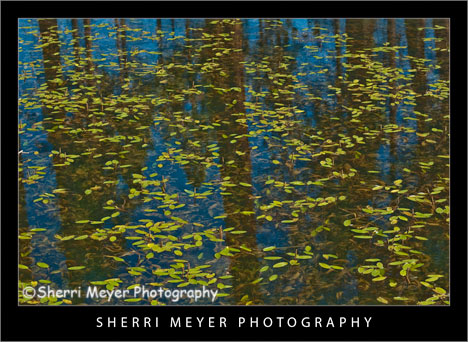
Leaves floating on Blue Lake in the Warner Mountains, Northeastern California.

It’s hard to believe another week has rolled around already and it’s time for another “Top 10 Lightroom Tweets of the Week.”

As Lightroom continues to explode, it is getting harder and harder to keep this list to 10. I’m thinking I might have to make it the “Top 20 Lightroom Tweets of the Week” for next weeks post. I guess that’s a good thing!

I hope you all are having a great week and you are having fun with Lightroom. In no particular order, here is the awesome list I put together for YOU this week. Enjoy and have a great weekend! [click to continue…]

kayak5

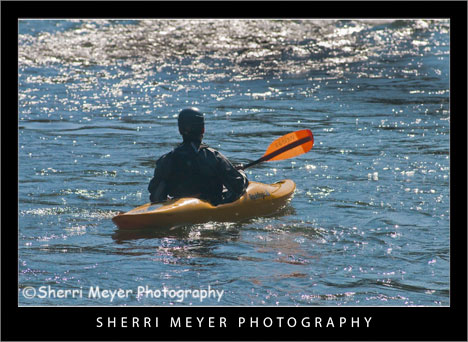
Photo #1 - Kayaking on the South Fork of the American River, near Coloma, California.

Today’s makeover is just for fun. This photo probably wouldn’t cut it for publication, but we don’t have to be serious all the time do we?

Every since I started using Lightroom 2, I haven’t done much with PhotoShop CS3. I used to love playing around with the filters and the distort filter Spherize was one of my favorites.

kayak6

Photo #2 - This is what the photo looked like straight out of the camera.

The Makeover – (Lightroom)

  1. Created a Virtual Copy.
  2. Set White Balance to daylight.
  3. Used the Nikon D300 preset.
  4. Increased the Highlight Recovery to tone down the hot spots.
  5. Increased the Luminance Smoothing to reduce the unwanted noise.

The Makeover – (PhotoShop CS3)

I used the distort filter Spherize. What I like about this filter is that it brings the subject in closer. It also kind of looks like the photo has a frame around it.

I hope you enjoyed this “Monday’s Makeover.” Opinions are always welcome!

Thank you for visiting. If you would like to leave a comment, simply click on the “comments” link (add your message in the box) at the bottom of this post.

You can also sign up for a “free” subscription to this Blog. Just look in the upper right hand side of the Blog under “Subscribe to Sherri’s Blog.” Then, either click on the orange button, or enter your email address and click on “subscribe.”

Visit our Stock Photo Website for links to photo galleries.

Top 10 Lightroom Tweets of the Week

by Sherri on June 19, 2009

lake-clementine4
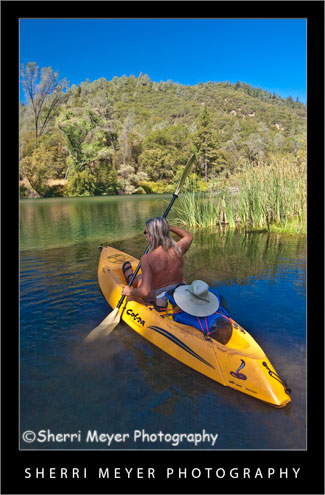
Kayaking Lake Clementine, Auburn, California.

Back by popular demand is another round-up of favorite Lightroom tweets. Once again, I have way too many to include in this post. That means, I will be doing the same thing again next week.

Thank you to all of you who either commented on last week’s blog post, started following me on Twitter, retweeted me, or included me in a post. A HUGE thanks to @MattKloskowski for featuring me on worth-a-click on the Adobe Lightroom Killer Tips Website. [click to continue…]

Wednesday’s WOW: No Hands Bridge

by Sherri on June 17, 2009

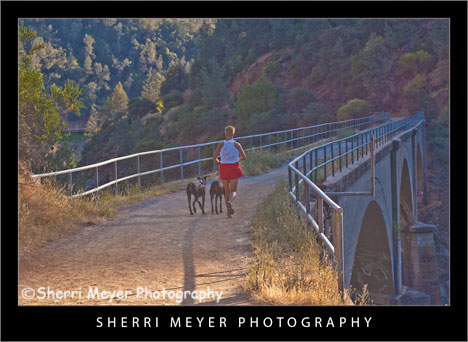
no-hands-bridge3
Woman running with her dogs across the famous “No Hands Bridge” in Auburn, California.

I chose to feature this photo in my “Wednesday’s WOW” post for a couple of reasons.

First of all, I really like it and secondly the annual Western States 100 Endurance Run is coming up June 27-28. If you have never heard of this race, it is a 100-mile foot race which starts in Squaw Valley, California and winds up in Auburn, California 100-miles later. The participants of this race will cross No Hands Bridge minutes before reaching the finish line at Placer High School. NOTE: This bridge is in both El Dorado and Placer counties. [click to continue…]

Monday’s Makeover: A Pair-O-Gliders

by Sherri on June 15, 2009

paragliding6

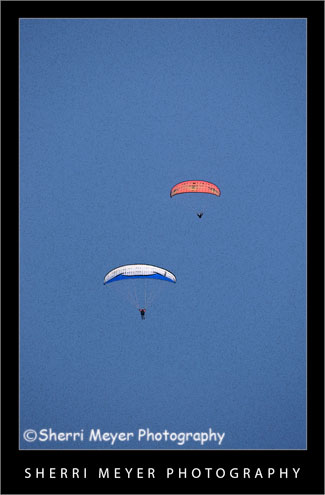
Photo #1 - Paragliding in the Sierra Foothills.

paragliding7

Photo #2 - Paragliding in the Sierra Foothills.

Sometimes I have a hard time tossing out a photo just because it’s out of focus. This photo is one of those photos. What I like to do when this happens is to apply my favorite artistic filter in PhotoShop CS3 “Poster Edges.”

Photo # 1 – In Lightroom 2, I set the White Balance to daylight and applied the Nikon D300 preset. Then, in PhotoShop CS3, I turned this out of focus photo into a digital art photo, by applying the “Poster Edges” filter.

Photo #2 – This is the way the NEF looked straight out of the camera.

Does this work for you? I’d love to hear your comments.

Thank you for visiting. If you would like to leave a comment, simply click on the “comments” link (add your message in the box) at the bottom of this post.

You can also sign up for a “free” subscription to this Blog. Just look in the upper right hand side of the Blog under “Subscribe to Sherri’s Blog.” Then, either click on the orange button, or enter your email address and click on “subscribe.”

Visit our Stock Photo Website for links to photo galleries.

Top 10 Lightroom Tweets of the Week

by Sherri on June 12, 2009

gloriosa-daisy
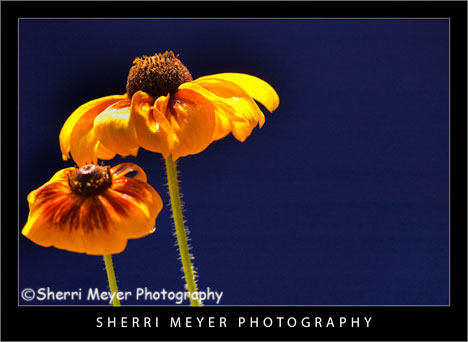
Gloriosa Daisy in my yard. In Lightroom, I changed the White Balance to daylight and used the Nikon D300 preset. I also touched up a few hot spots on the petals with the “Recovery Slider.”

As a fairly new and totally hooked Lightroom user, I am always looking for great Lightroom tips. Each week, I keep my eyes wide-open for information I feel is worthy of passing along to other Lightroom users, or those thinking about becoming one. Hopefully, you will find useful information or you will pick up a few new folks to follow.

Here are my “Top 10 Lightroom Tweets of the Week” in no particular order. Enjoy! [click to continue…]

paragliding5
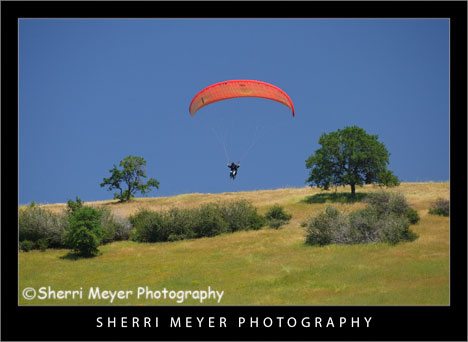
Paraglider flying over the Cronan Ranch, Pilot Hill, California.

This week is the week for starting new things. On Monday, I started “Monday Makeover.” Today, I am starting something else new and exciting. I am going to post a photo that makes me say “WOW.” But, that’s not all. I’m going to tell you why I think it qualifies as a WOW photo.

5 reasons why this photo makes me say WOW!

Feeling or emotion – The first thing I get when I look at this photo is a feeling. While I can’t actually say I know what it feels like to take off like this guy is doing, I can feel it in the photo.

Composition – I love the composition. The elements in the photo are well balanced and are very pleasing to the eye.

Color – The color really pops in this photo. I did use the Nikon D300 preset for Lightroom, to add a little punch to the color.

Lighting – Even though this photo was taken in April at 1:40 in the afternoon, the lighting works for me. The way the wing is illuminated by the sun really catches my eye.

Timing – The fact that this was shot during take off makes it a really strong image too. These guys don’t always get enough lift to get off the ground.

Don’t go away just yet. I am also going to recommend that you look at this WOW photo by Kathleen Connally. If you would like to suggest a particular photo to be included in an upcoming Wednesday’s WOW post, please send me an email @sherri@sherrimeyer.com.

NOTE: The idea for “Makeover Monday” and “WOW Wednesay” were both inspired by junk email or snail mail I have saved. I knew they would come in handy for something someday!

Thank you for visiting. If you would like to leave a comment, simply click on the “comments” link (add your message in the box) at the bottom of this post.

You can also sign up for a “free” subscription to this Blog. Just look in the upper right hand side of the Blog under “Subscribe to Sherri’s Blog.” Then, either click on the orange button, or enter your email address and click on “subscribe.”

Visit our Stock Photo Website for links to photo galleries.
deschutes-river4
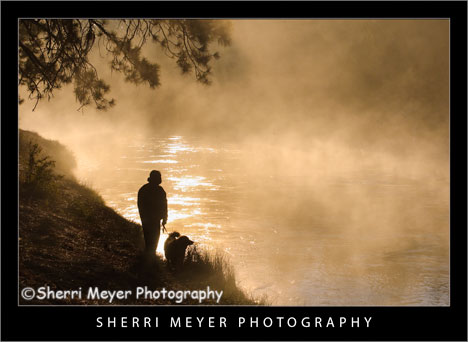
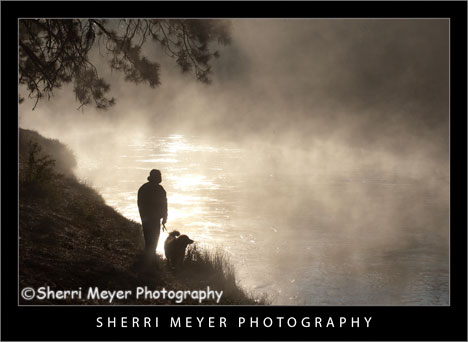
Photo #1 – A foggy morning along the Deschutes River, Oregon.

Today, I’m starting “Makeover Monday.” Each week, I’m going to select one image from our Lightroom catalog (NEF) and give it a makeover. NEF files straight out of the camera are dull and can always be improved with processing.

I will post both images; the image straight out of the camera and the image with the makeover. Then, I will explain what I did to achieve the results I wanted.

This image was selected for a makeover because, it is one of a series of images we are presently developing, to be uploaded soon to our Baby Boomer gallery.

deschutes-river5
Photo #2 – A foggy morning along the Deschutes River, Oregon.

Photo #1 – to get the results above, I changed the White Balance to Daylight to warm it up a bit. Then, I applied this wonderful Nikon D300 Preset developed by Christian LøverÃ¥s of Oslo, Norway. We just started using this preset yesterday and we love it! I then used the Adjustment Brush to tone down the over exposed glare on the water.

Photo #2 – this is the NEF the way it looked straight out of the camera.

Which one do you like best?

Thank you for visiting. If you would like to leave a comment, simply click on the “comments” link (add your message in the box) at the bottom of this post.

You can also sign up for a “free” subscription to this Blog. Just look in the upper right hand side of the Blog under “Subscribe to Sherri’s Blog.” Then, either click on the orange button, or enter your email address and click on “subscribe.”

Visit our Stock Photo Website for links to photo galleries.
Top 10 Photo Related Tweets of the Week

by Sherri on June 5, 2009

kayak41
Kayaking on the South Fork of the American River, near Coloma, California.

I have rounded up another group of my favorite photo related “Tweets of the Week” for you all. I hope you like them too. Please let me know in the comments section below if you picked up any new folks to follow, or any useful information. You can also suggest a favorite photo related tweet of yours, for an upcoming post.

Here is my “Top 10 Photo Related Tweets of the Week” in no particular order.

  1. @blackstar 10 Ways to Fight for Your Digital Rights as a Photographer http://twurl.nl/73sxyv
  2. @newmediaphoto Do you let clients stomp all over you? http://bit.ly/16V1ly
  3. @enlightphoto Travel & Leisure: Best Views of US National Parks they could find = mediocre. You get what you pay for http://bit.ly/BUDkH
  4. @FreelanceSw: 12 Breeds of Client and How to Work with Them http://bit.ly/yUgTr
  5. @davidsanger: Finding stolen Stock Photos with Tineye: Fakorama http://bit.ly/13M8Be
  6. @jimgoldstein 5 Tips to Get The Most Out of Twitter | JMG-Galleries – Jim M. Goldstein Photograp… http://bit.ly/1blPUd
  7. @ricksammon Top 10 Tips for Successful Social Media Marketing: http://tinyurl.com/lrurzp
  8. @younesbounhar Learn to see creatively http://younesbounhar.com/blog
  9. @paul_indigo How much photographic equipment do you really need? by  http://bit.ly/RBdZq.
  10. @chasejarvis Consequences of Creative Vision (the final straw!) http://twurl.nl/zpx5c6

Here are the links to the last 2 weeks Top 10 Photo Related Tweets of the Week in case you missed them:

Week 1 – Top 10 Photo Related Tweets of the Week

Week 2 – Top 10 Photo Related Tweets of the Week

You can retweet (RT) this post, by clicking on the lime green retweet button at the bottom of this post. It will take you directly to Twitter. If you don’t know about the importance of retweeting, please refer to this post by Jim Goldstein.

Coming next week – Top 10 Lightroom Tweets of the Week

Thank you for visiting. If you would like to leave a comment, simply click on the “comments” link (add your message in the box) at the bottom of this post.

You can also sign up for a “free” subscription to this Blog. Just look in the upper right hand side of the Blog under “Subscribe to Sherri’s Blog.” Then, either click on the orange button, or enter your email address and click on “subscribe.”

Visit our Stock Photo Website for links to photo galleries.