Wednesday’s WOW – Ethereal Webs

by Sherri on July 15, 2009

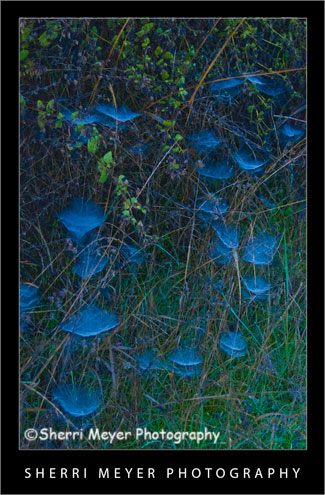
Ethereal-Webs-2Backlit spider webs covered with dew, Auburn, California.

One fall morning while on a hike, I found these webs all lit up beautifully with backlighting and covered with dew.

Why this photo makes me say WOW!

  1. Backlighting – Backlighting is one of my favorite types of lighting. I think it worked really well here.
  2. Colors – I really love green & blue together. I think the two colors compliment each other well. Our house is even decorated with green & blue.
  3. Uniqueness – It’s not every day you get to witness dewey, backlit spider webs. If it hadn’t been for the fact that I was trying out my brand new first DSLR (a Nikon D70) and looking for things to photograph, I could have missed this opportunity. The others I was hiking with didn’t even notice them!

I hope you keep your eyes wide-open next time you are out and about with your camera. You just never know what you might stumble upon!

Thank you for visiting. If you would like to leave a comment, simply click on the “comments” link (add your message in the box) at the bottom of this post.

You can also sign up for a “free” subscription to this Blog. Just look in the upper right hand side of the Blog under “Subscribe to Sherri’s Blog.” Then, either click on the orange button, or enter your email address and click on “subscribe.”

Visit our Stock Photo Website for links to photo galleries.
Monday’s Makeover: My Neighborhood

by Sherri on July 13, 2009

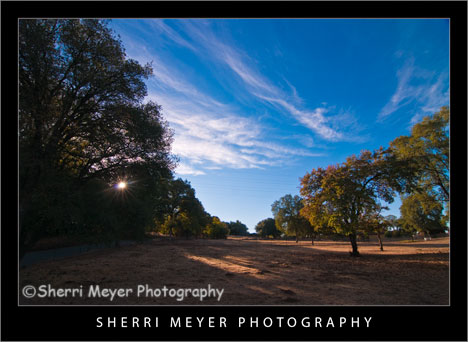
Rural-Auburn-CA

Photo #1 - My neighborhood, rural Auburn, California.

While looking through my images this morning for an image to makeover, I came across this one. This is very much the way the lighting would look at this location if we were walking right now.

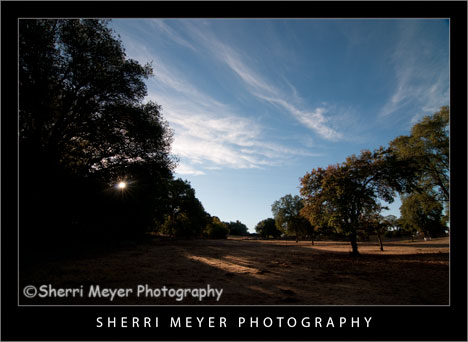
Rural-Auburn-CA-2

Photo #2 - This is the way the photo looked straight out of the camera.

Can you guess what I did to photo #2 below to get the results you see in the top photo? Bring on the guesses. I’d love to hear from you. While it’s pretty tough to guess exactly what all was done, some of you come pretty darn close. I will reveal the answers later in the week. Thank you in advance for your participation!

Thank you for visiting. If you would like to leave a comment, simply click on the “comments” link (add your message in the box) at the bottom of this post.

You can also sign up for a “free” subscription to this Blog. Just look in the upper right hand side of the Blog under “Subscribe to Sherri’s Blog.” Then, either click on the orange button, or enter your email address and click on “subscribe.”

Visit our Stock Photo Website for links to photo galleries.
Monday’s Makeover Update:

Well, I didn’t get a whole lot of responses, but thanks to Matt and Hali for your participation! Here is what I did in Lightroom to improve my original photo:

  1. Made a virtual copy.
  2. Set white balance to daylight.
  3. Set recovery to 10.
  4. Set fill light to 25.
  5. Set blacks to 0.
  6. Set clarity to 50.
  7. Set vibrance to 80.

NOTE: Unfortunately, I don’t have time to post a Monday Makeover this week. I have taken on a few new projects that are eating up my blogging time.

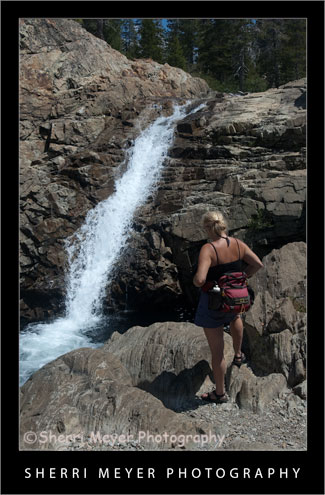
hiker-canyon-creek

Photo # 1 - Hiker viewing one of several waterfalls on Canyon Creek, near Lake Faucherie, Tahoe National Forest, California.

Can you guess what I did to photo #2 (below) in Lightroom to achieve the results you see in #1? This week I’m doing something a little different with my Monday Makeover. Instead of telling you what I did, I am curious to see if you can guess what I did. I will let the cat out of the bag, after I get a few responses.

hiker-canyon-creek2

Photo #2 - This is what the photo looked like straight out of the camera.

Thank you for visiting. If you would like to leave a comment, simply click on the “comments” link (add your message in the box) at the bottom of this post.

You can also sign up for a “free” subscription to this Blog. Just look in the upper right hand side of the Blog under “Subscribe to Sherri’s Blog.” Then, either click on the orange button, or enter your email address and click on “subscribe.”

Visit our Stock Photo Website for links to photo galleries.
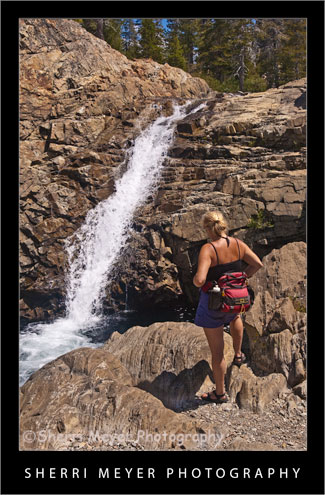
Photo Update – the cat is out of the bag! (July 10th)

Thanks to all of you that gave your best shot at guessing what I did during this photo makeover. I won’t make you wait a minute longer. I am now letting the cat out of the bag. Here is what I did to the original photo in Lightroom 2.

  1. Set White Balance to daylight.
  2. Set the Fill Light to +40.
  3. Set the Clarity to +100.
  4. Set the Vibrance to +70.

That’s it folks. Thanks again for your participation and for your patience!

Top 20 Lightroom Tweets of the Week

by Sherri on July 3, 2009

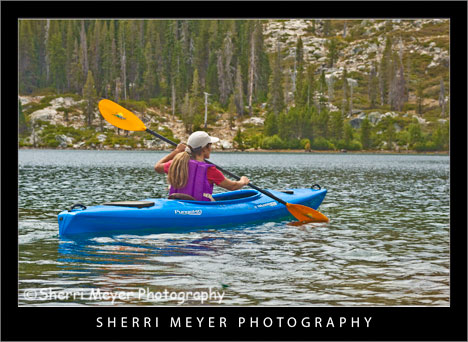
kayaking-lake-faucherie

I took this photo of my friend Peg, during our kayak adventure on Lake Faucherie, Tahoe National Forest, California.

As promised, you are going to get twice as many top Lightroom Tweets this week. I hope you will find them useful. If not, maybe you will find some new and interesting people to follow on Twitter. Have a great weekend everyone and Happy 4th of July!

Here are 20 awesome Lightroom Tweets handpicked especially for you! As always, they are in no particular order. [click to continue…]

auburn-courthouse
Photo #1 – Historic Auburn Courthouse, Auburn, California.

This beautiful building has become one of my favorite local subjects to photograph. It is so close to home, I can return and capture it’s beauty each season, at different times of the day and under many different lighting situations!

auburn-courthouse2
Photo # 2 – This is what the photo looked like straight out of the camera.

The Makeover – (Lightroom)

  1. Added +25 fill light.
  2. Adjusted the Clarity to +100.
  3. Adjusted the Vibrance to +60.

That’s all folks. I hope you enjoyed this “Monday’s Makeover.” Opinions are always welcome!

Thank you for visiting. If you would like to leave a comment, simply click on the “comments” link (add your message in the box) at the bottom of this post.

You can also sign up for a “free” subscription to this Blog. Just look in the upper right hand side of the Blog under “Subscribe to Sherri’s Blog.” Then, either click on the orange button, or enter your email address and click on “subscribe.”

Visit our Stock Photo Website for links to photo galleries.
kayak5

Photo #1 - Kayaking on the South Fork of the American River, near Coloma, California.

Today’s makeover is just for fun. This photo probably wouldn’t cut it for publication, but we don’t have to be serious all the time do we?

Every since I started using Lightroom 2, I haven’t done much with PhotoShop CS3. I used to love playing around with the filters and the distort filter Spherize was one of my favorites.

kayak6

Photo #2 - This is what the photo looked like straight out of the camera.

The Makeover – (Lightroom)

  1. Created a Virtual Copy.
  2. Set White Balance to daylight.
  3. Used the Nikon D300 preset.
  4. Increased the Highlight Recovery to tone down the hot spots.
  5. Increased the Luminance Smoothing to reduce the unwanted noise.

The Makeover – (PhotoShop CS3)

I used the distort filter Spherize. What I like about this filter is that it brings the subject in closer. It also kind of looks like the photo has a frame around it.

I hope you enjoyed this “Monday’s Makeover.” Opinions are always welcome!

Thank you for visiting. If you would like to leave a comment, simply click on the “comments” link (add your message in the box) at the bottom of this post.

You can also sign up for a “free” subscription to this Blog. Just look in the upper right hand side of the Blog under “Subscribe to Sherri’s Blog.” Then, either click on the orange button, or enter your email address and click on “subscribe.”

Visit our Stock Photo Website for links to photo galleries.
Top 10 Lightroom Tweets of the Week

by Sherri on June 19, 2009

lake-clementine4
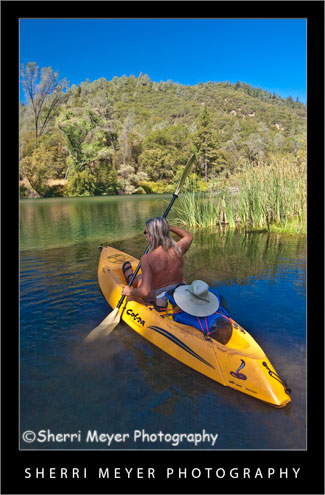
Kayaking Lake Clementine, Auburn, California.

Back by popular demand is another round-up of favorite Lightroom tweets. Once again, I have way too many to include in this post. That means, I will be doing the same thing again next week.

Thank you to all of you who either commented on last week’s blog post, started following me on Twitter, retweeted me, or included me in a post. A HUGE thanks to @MattKloskowski for featuring me on worth-a-click on the Adobe Lightroom Killer Tips Website. [click to continue…]

Wednesday’s WOW: No Hands Bridge

by Sherri on June 17, 2009

no-hands-bridge3
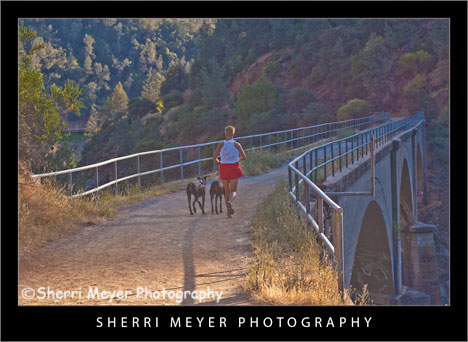
Woman running with her dogs across the famous “No Hands Bridge” in Auburn, California.

I chose to feature this photo in my “Wednesday’s WOW” post for a couple of reasons.

First of all, I really like it and secondly the annual Western States 100 Endurance Run is coming up June 27-28. If you have never heard of this race, it is a 100-mile foot race which starts in Squaw Valley, California and winds up in Auburn, California 100-miles later. The participants of this race will cross No Hands Bridge minutes before reaching the finish line at Placer High School. NOTE: This bridge is in both El Dorado and Placer counties. [click to continue…]

Monday’s Makeover: A Pair-O-Gliders

by Sherri on June 15, 2009

paragliding6

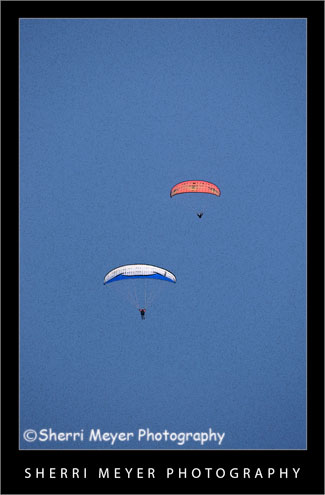
Photo #1 - Paragliding in the Sierra Foothills.

paragliding7

Photo #2 - Paragliding in the Sierra Foothills.

Sometimes I have a hard time tossing out a photo just because it’s out of focus. This photo is one of those photos. What I like to do when this happens is to apply my favorite artistic filter in PhotoShop CS3 “Poster Edges.”

Photo # 1 – In Lightroom 2, I set the White Balance to daylight and applied the Nikon D300 preset. Then, in PhotoShop CS3, I turned this out of focus photo into a digital art photo, by applying the “Poster Edges” filter.

Photo #2 – This is the way the NEF looked straight out of the camera.

Does this work for you? I’d love to hear your comments.

Thank you for visiting. If you would like to leave a comment, simply click on the “comments” link (add your message in the box) at the bottom of this post.

You can also sign up for a “free” subscription to this Blog. Just look in the upper right hand side of the Blog under “Subscribe to Sherri’s Blog.” Then, either click on the orange button, or enter your email address and click on “subscribe.”

Visit our Stock Photo Website for links to photo galleries.

paragliding5
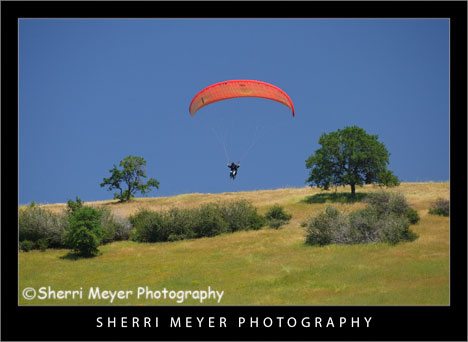
Paraglider flying over the Cronan Ranch, Pilot Hill, California.

This week is the week for starting new things. On Monday, I started “Monday Makeover.” Today, I am starting something else new and exciting. I am going to post a photo that makes me say “WOW.” But, that’s not all. I’m going to tell you why I think it qualifies as a WOW photo.

5 reasons why this photo makes me say WOW!

Feeling or emotion – The first thing I get when I look at this photo is a feeling. While I can’t actually say I know what it feels like to take off like this guy is doing, I can feel it in the photo.

Composition – I love the composition. The elements in the photo are well balanced and are very pleasing to the eye.

Color – The color really pops in this photo. I did use the Nikon D300 preset for Lightroom, to add a little punch to the color.

Lighting – Even though this photo was taken in April at 1:40 in the afternoon, the lighting works for me. The way the wing is illuminated by the sun really catches my eye.

Timing – The fact that this was shot during take off makes it a really strong image too. These guys don’t always get enough lift to get off the ground.

Don’t go away just yet. I am also going to recommend that you look at this WOW photo by Kathleen Connally. If you would like to suggest a particular photo to be included in an upcoming Wednesday’s WOW post, please send me an email @sherri@sherrimeyer.com.

NOTE: The idea for “Makeover Monday” and “WOW Wednesay” were both inspired by junk email or snail mail I have saved. I knew they would come in handy for something someday!

Thank you for visiting. If you would like to leave a comment, simply click on the “comments” link (add your message in the box) at the bottom of this post.

You can also sign up for a “free” subscription to this Blog. Just look in the upper right hand side of the Blog under “Subscribe to Sherri’s Blog.” Then, either click on the orange button, or enter your email address and click on “subscribe.”

Visit our Stock Photo Website for links to photo galleries.