I Lied!

by Sherri on April 13, 2010

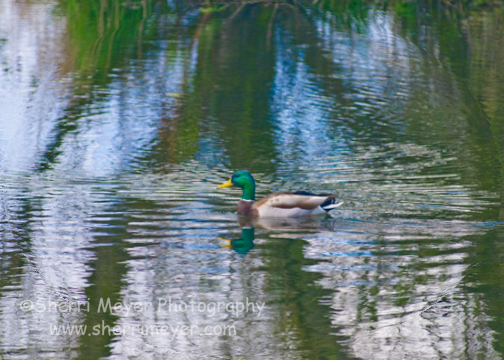
Duck-3

This photo was captured this morning at a pond in our rural Auburn, California neighborhood. It was processed using both Adobe Photoshop Lightroom 2 & CS3.

A few minutes ago I wrote this on my Facebook Fan Page.

Photo adventure this morning = BIG FLOP. Took camera with me on a walk. Planned on shooting Poppies. On the way to the Poppy patch, I came upon an unexpected Egret at the pond. Cool I thought, until I realized I had no memory card. Went home & got memory card. Returned to pond = no Egret. Went to Poppy patch = Poppies not open! ๐Ÿ™

Well, that wasn’t 100% true. As it turns out, I did manage to get a couple photos of this duck that I liked. I decided to put one of them up here to hold me over, until I can get my article on Lightroom finished. It’s taking me longer than I thought and it’s been way too long since my last post!

Stay tuned. My Lightroom post will be done soon and I think it will be worth the wait! ๐Ÿ˜‰

Thank you for your patience!

~Sherri

Bobby Finally Did It!

by Sherri on April 2, 2010

Bobby-Retire-3

Baby Boomer Bobby Tudsbury kickin' up her heels, during her "Big Time Wowy-Zowy Retirement Party," on Wednesday in Roseville, California.

Wednesday was a very unique day for Jeff & I. We attended a retirement party we will never forget. Our friend, Bobby Tudsbury, rounded up about 40 friends and relatives for a one of a kind party to celebrate the “end of an era.” After working as a Hostler/Servicing Engineer at the J.R. Davis Railroad Yard in Roseville for 33 years, Bobby was calling it quits.

We were to arrive at the Railroad Yard promptly at 4:00 in the afternoon, for a group photo on (and around) one of the locomotives. Women were to come dressed SEXY. That didn’t fly too well with most of us ladies. It was cold. I opted for warm, not SEXY. Sure glad I did!

Funny thing, the group photo was more like 100 group photos. Our friend, Steve Chandler, was the lucky one with the assignment and he is a Landscape Photographer! He did a great job and was a great sport.

While it was a ton of fun being in the photos, I wanted to see the group from the Photographers perspective. I took a few photos and this one was one of my favorites!

As always, thanks for visiting and comments are always welcome and appreciated!

~Sherri

New Outdoor Lifestyle Image

by Sherri on March 29, 2010

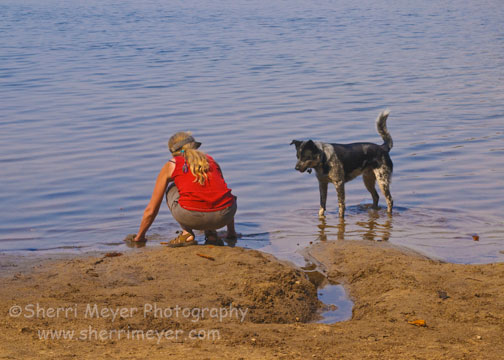
Kim-&-Dog

Kim Brown and her new dog friend, Utica Reservoir, Alpine County, California.

We are in the midst of developing a new collection of Travel and Outdoor Lifestyle images. Here is one of the images that will be added to our Outdoor Lifestyles Gallery soon.

Check out this article “6 Tips for Capturing Great Outdoor Lifestyle Photos” to see how I go about creating images such as the one above. If you have any questions or comments about this image, please feel free to add them in the comments section below.

Thank you for visiting!

~Sherri

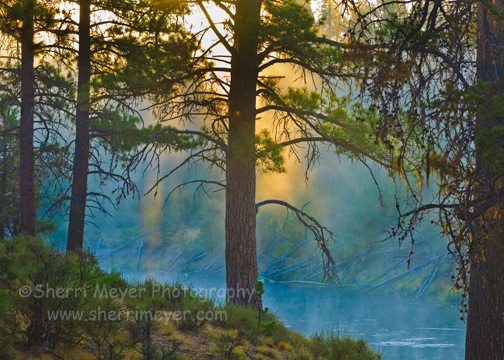
Deschutes-River-6

Foggy morning along the Deschutes River, La Pine State Park, La Pine, Oregon. This image was developed using Adobe Photoshop Lightroom 2.

It’s time for another print giveaway. I’m going to give away a FREE 8×12 print (value=$45.00) to the person that comes up with the best name for this image. Calling this image the “Deschutes River” is simply too boring. Please use your imagination and come up with a very descriptive name. Put your feelings into words!

Here is how it works:

  1. You must be a Fan of Sherri Meyer Photography on Facebook in order to qualify. To become a Fan, simply click on Sherri Meyer Photography.
  2. You must be a resident of the United States or Canada.
  3. Add your choice of names in the comments section below. Comments will be moderated if you have never left a comment on this Blog before.
  4. This contest starts today and ends 1 week from today.
  5. The person with the winning entry will be notified by email. You will need to let me know which image you would like and where you want the print shipped to. I will also announce the lucky winner on Facebook and Twitter.
  6. The winner can choose any images from our Stock Photo Archive, or from this Photo Blog.
  7. I think that about covers it. If you have any questions, please add them in the comments section below.

Who will the lucky winner of the FREE 8×12 print be? We will find out 1 week from today!

Have a super weekend everyone!

~Sherri

Top 10 Lightroom Tweets of the Week

by Sherri on March 12, 2010

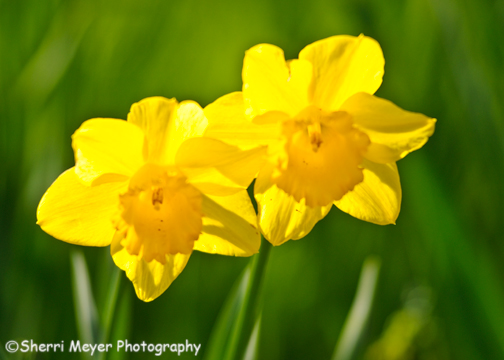
Daffodils

Spring is here. Daffodils such as these are "springing" up all over our neighborhood in Auburn, California. This was developed using Adobe Photoshop Lightroom 2.

Are you ready for 10 new Lightroom tips for your weekend? Well, here they are in random order. Enjoy!

  1. @OutdoorPhotoMagรขโ‚ฌโ„ขs Lightroom quick tips, including keywords, spray painting and more – http://bit.ly/cZYiCq.
  2. @Lightroom Lightroom’s Virtual Copies are helpful for a multitude of reasons. Find out why here – http://bit.ly/bi3JJx.
  3. @Lightroomers Two fast ways to apply develop setting to multiple photos in Lightroom http://bit.ly/bCNJbR.
  4. @aj_wood —> my latest Lightroom article is up on TipSquirrel http://bit.ly/9461vc “Lightroom vs Adobe Bridge.”
  5. @heninger It’s Lightroom Tuesday (Evening). Tips, Tricks & Tutorials for the Lightroom-enhanced among us http://heninger.org.
  6. @xequals New on X-Equals – Yield the Wheel รขโ‚ฌโ€œ A Lightroom mouse trick – http://bit.ly/bYOe1r.
  7. @ShebaJo Arrange Files Your Way in Lightroom – http://bit.ly/aeeG6l.
  8. @LRSecrets New Article: What I’d Like to See in Lightroom 4 http://lightroomsecrets.com/1256 beCP.
  9. @photographyblog 21 Reasons to use Lightroom http://bit.ly/bWJdxa.
  10. @Lightroom A quick tutorial on how to create a passport photo with Lightroom http://bit.ly/aEYKkd.

In case you missed my previous “Top 10 Tweets of the Week” posts, you can view them all by clicking on the Top 10 Tweets of the Week category on the sidebar of this Photo Blog.

You can retweet (RT) this post, by clicking on the lime green retweet button at the bottom of this post. It will take you directly to Twitter. If you don’t know about the importance of retweeting, please refer to this post by Jim Goldstein.

Thank you for visiting. If you would like to leave a comment, simply click on the “comments” link (add your message in the box) at the bottom of this post.

Have a great weekend everyone!

~Sherri

5 Ways to Shoot a Subject

by Sherri on March 9, 2010

Auburn-Courthouse-5

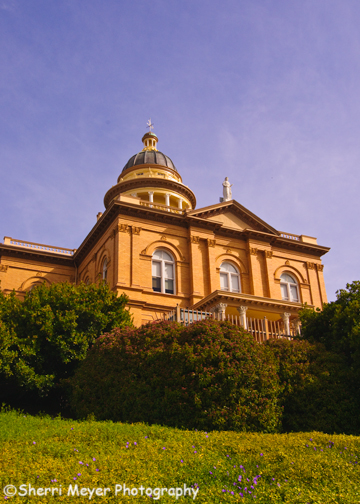
Spring shot of the Historic Auburn Courthouse, Auburn, California.

Capturing a subject in many different ways can be done all in one photo shoot, or over time. It’s always a good idea when you have a great subject in front of you to really explore it and shoot it as many ways as possible. You may never get to return and re-shoot it later!

The Historic Auburn Courthouse pictured above is a subject I have access to 24/7/365 and I have shot it many different ways. If you have a good subject close to home, I recommend practicing these tips on it first, before taking that once in a lifetime dream vacation.

Here are 5 examples of how I have shot the Auburn Courthouse:

Different Seasons – In order to shoot your subject in different seasons, obviously you need to be able to return to the location. I have shot the Auburn Courthouse in both Spring (see photo above) and Winter. Here is a shot of the Auburn Courthouse in the Winter.

At night – Shooting at night can be challenging. I also don’t have a lot of night shooting experience, but here is a night shot of the Auburn Courthouse I did manage to get that I really like.

Different lenses – Experiment using different lenses. The shot above was taken with a 12-24mm wide-angle lens. For this shot of the Auburn Courthouse, I used a 28-70mm lens.

Shoot Horizontal and Vertical – Many subjects work equally well shot in both formats, others don’t. If you are shooting for publication, vertical shots are the desired format for COVERS, while horizontals are often used for CENTER SPREADS. Here is a horizontal shot of the Auburn Courthouse.

Frame Your Subject – You can frame your subject many different ways. For examples of how you can frame your subject, check out this link. Here is a shot of the Auburn Courthouse using this technique.

For a few more ideas on how you can shoot a subject, check out this link.

What are your favorite ways to shoot a subject? Feel free to add them to the comments section below.

Thank you for visiting!

~Sherri
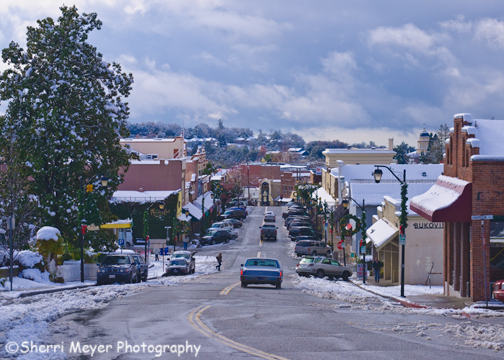
Downtown-Auburn

Downtown Auburn, California photo taken in December of 2009 & developed using Adobe Photoshop Lightroom 2.

Please note: I am getting a lot of traffic to this blog post. Although this sale expired a long time ago, you can still purchase this print and others of Auburn, California from our Auburn Gallery.

Hi everyone. Just wanted to let you know that we have just updated our Print Specials Gallery for the month of March. We are offering a 20% off savings on this selection of Auburn, California images to our Facebook Fans.

Included in this Print Specials Gallery are images of the American River, Downtown Auburn, Old Town Auburn, the Foresthill Bridge, No Hands Bridge and more.

Thanks for stopping by! If you have any questions or comments, please feel free to leave them in the comments section below. We love to hear what you have to say!

~Sherri

Why Become a Fan of Sherri Meyer Photography?

by Sherri on February 24, 2010

Auburn-Courthouse-4

Another shot of the Historic Auburn Courthouse in the snow, captured in December of 2009.

Become a Fan of Sherri Meyer Photography on Facebook – it’s FREE! Here’s what you get:

Fans only special savings. Please see our Print Specials Gallery for the specials we are currently offering our Fans.

Win “FREE” prints. As Fans of Sherri Meyer Photography, you can enter to win FREE prints of your choice, simply by participating in my new and exciting Fan challenges. This photo of me canoeing with my dog was the winner’s choice from my recent contest.

Get updates on our newest images. Each time we add new images to our Website, we will post it on our Fan Page.

See more photos. Some of you are already my Facebook Friends, but I don’t post many photos there. If you would like to see more photos, become a Fan of Sherri Meyer Photography.

Ask your questions. Do you have questions about photography or the Auburn, California area? If so, fire away. This is a good place to ask them!

To become a Fan, you can click here, or on the facebook button above on the right.

More coming soon!

Thank you for visiting! If you have any questions, feel free to enter them in the comments section below.

~Sherri

Winner’s Choice

by Sherri on February 22, 2010

Sherri-&-Sierra-Canoeing

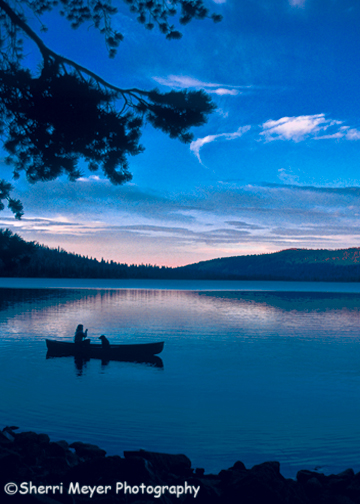
Sherri & Sierra canoeing on Gold Lake in Sierra County, California. This image was developed using Adobe Photoshop Lightroom 2.

A few days ago, I ran a little contest. The first person to leave 5 comments on this Photo Blog would win a “FREE” 8×12 print of their choice. I had never done anything like this before, so I didn’t know quite what to expect.

Within a few minutes, 3 of my facebook Fans had participated in my little challenge. The winner, Erin Gonzalez, selected this photo of my dog Sierra & I canoeing on Gold Lake in Sierra County, California.

I am planning to do this again soon. If you would like a chance at winning a “FREE” photo, you will need to become a Fan of Sherri Meyer Photography. As a Fan, you will be able to participate in challenges such as this, take advantage of our specials and more.

Thank you for visiting!

~Sherri

New Travel, Landscape & Nature Images

by Sherri on February 19, 2010

American-River-8

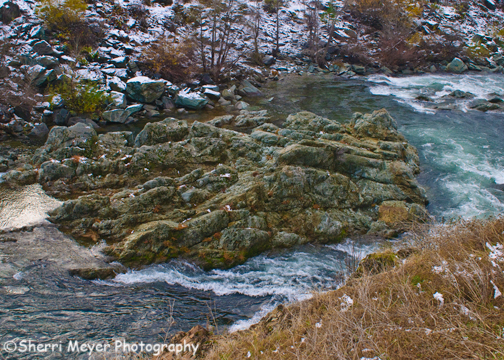
The Middle Fork of the American River in Auburn, CA, just after a rare, low snowfall in December 2009. This image was developed using Adobe Photoshop Lightroom 2.

We have just added a new collection of Travel, Landscape and Nature images to our PhotoShelter Archive. The easiest way to view them is by clicking on the New Images Gallery. This is where you will always find our newest images, which have been added to our Website.

These images have all been developed using the amazing Adobe Photoshop Lightroom 2 Photo Management Software. See this link for over 200 Adobe Photoshop Lightroom Tips.

Thank you for visiting and enjoy your weekend everyone! ๐Ÿ™‚

~Sherri