Top 10 Lightroom Tweets of the Week

by Sherri on August 7, 2009

Goose

Silhouette of a Goose at Utica Reservoir, Alpine County, California.

Silhouette of a Goose at Utica Reservoir, Alpine County, California.

This photo was taken soon after we landed at Utica Reservoir, during our recent camping trip.

After Jeff and I and our friends Jeff and Kim decided on a campsite, Kim and I wandered down to the lake to scout out photo opportunities. We had to run back to camp to grab our cameras. The conditions couldn’t have been any better. The lighting was perfect. A gaggle of Geese flew in to greet us. Beautiful clouds surrounded us. Everything lined up perfectly! We photographed the heck out of those Geese. The photo shown here is one of my favorites from the ones I captured.

[click to continue…]

Back to Reality

by Sherri on August 5, 2009

Utica-Reservoir

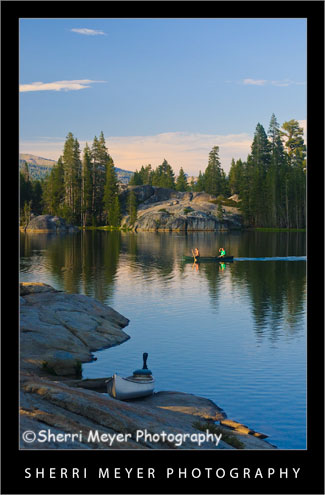
Canoeing on Utica Reservoir, Alpine County, California.

We are back. We just spent 6 days at Utica Reservoir and it is just as wonderful as it was 26 years ago!

This photo is one of many I will be sharing during the coming weeks. We came back with hundreds of fresh images and we covered just about everything on our shoot list. It was one of the most successful photographic adventures to date.

Things are quite piled up around here everywhere you look. I sure hope we don’t have any drop-in company any time soon. It looks like a tornado touched down in our house.

That said, I’m not quite sure when the next post will be. But, hopefully it will be worth the wait.

Be back soon.

Thank you for visiting. If you would like to leave a comment, simply click on the “comments” link (add your message in the box) at the bottom of this post.

You can also sign up for a “free” subscription to this Blog. Just look in the upper right hand side of the Blog under “Subscribe to Sherri’s Blog.” Then, either click on the orange button, or enter your email address and click on “subscribe.”

Visit our Stock Photo Website for links to photo galleries.

What’s New & Our Travel Plans

by Sherri on July 27, 2009

Photo-Collage

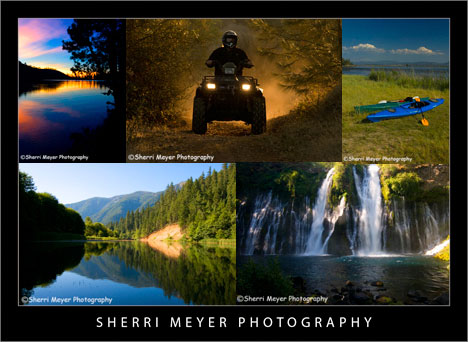
The images in this collage are some of our favorite images, that have appeared on this blog during the last year.

What’s New

We have been really busy lately, accomplishing a few projects and getting a start on other projects before taking off for a few days.

You may have noticed, this Photo Blog has a new look. We are now using a new theme called Thesis. It isn’t free, but it is money well spent. It makes blogging so much more simplified and you can customize it to suit your own needs. You can get Thesis here.

We are also in the process of developing a large collection of new active baby boomer images. We hope to have them in our galleries soon after returning from our trip. After our return, we will also be making a few changes to our Website.

Before I forget, there is one other thing that I want to mention. I have started a new group on Facebook called “Adobe Photoshop Lightroom.” If you currently use Lightroom or are planning to use it, this group might be of interest to you. To join, click on this Adobe Photoshop Lightroom link.

Our Travel Plans

We will be heading out on Wednesday 7/29 for a few days. We will be camping in Alpine County, California. Other counties we will be traveling through are: Placer, El Dorado, Amador, Calaveras and Tuolumne. We are leaving the computer behind. My eyes need a break from the screen BIG time! I’m sure some of you can relate to this. We will also be without Internet Service. That will give us more time for photographing and adventure! Following is a partial list of subjects we plan on shooting during our visit to Alpine County.

Photo Shoot List

  1. Kayaking
  2. Canoeing
  3. Hiking
  4. Camping
  5. Baby Boomers
  6. Cooking (Dutch Oven)
  7. Fishing
  8. Relaxing
  9. Nature
  10. Landscapes
  11. Gold Rush Towns along Highway 49

Note: My next post will be on August 4th or 5th!

Thank you for visiting. If you would like to leave a comment, simply click on the “comments” link (add your message in the box) at the bottom of this post.

You can also sign up for a “free” subscription to this Blog. Just look in the upper right hand side of the Blog under “Subscribe to Sherri’s Blog.” Then, either click on the orange button, or enter your email address and click on “subscribe.”

Visit our Stock Photo Website for links to photo galleries.
River of Gold

by Sherri on July 25, 2009

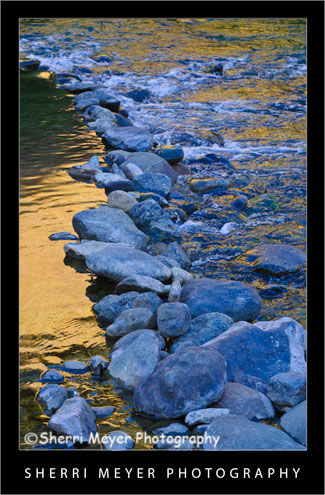
American-River-Rocks-3North Fork of the American River, Auburn, California.

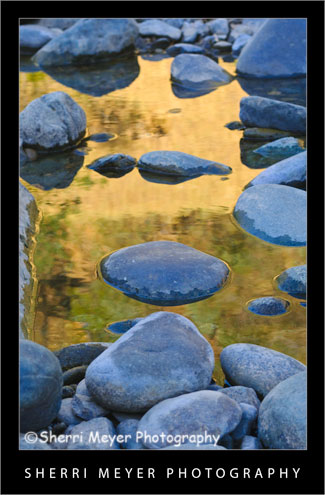
This image was captured just a little further downstream from the photo of the rocks I posted a couple of days ago. It will be available for purchase as a fine art print soon!

Thank you for visiting. If you would like to leave a comment, simply click on the “comments” link (add your message in the box) at the bottom of this post.

You can also sign up for a “free” subscription to this Blog. Just look in the upper right hand side of the Blog under “Subscribe to Sherri’s Blog.” Then, either click on the orange button, or enter your email address and click on “subscribe.”

Visit our Stock Photo Website for links to photo galleries.
Top 10 Lightroom Tweets of the Week

by Sherri on July 24, 2009

J&C-American-RiverJeff & Cocoa cooling off in the North Fork of the American River, Auburn, California. I think I shall title this photo “Rear View!”
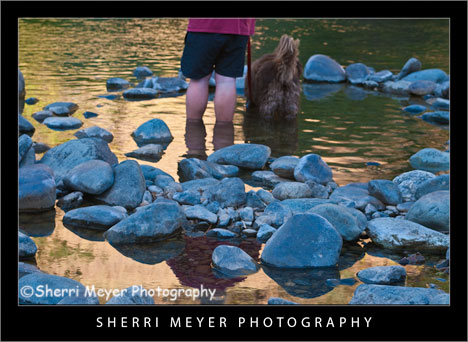
While down at the river Monday evening, I couldn’t resist capturing these two wading in this little kiddie pool. In particular, I wanted to get a unique composition of them!

It’s Friday again and time for 10 more HOT Lightroom Tweets. Here they are in no particular order.

  1. @LightroomQueen New blog post: TheLightroomLab.com reviews my book http://bit.ly/Otuc0.
  2. @gavinseim Hitting the \ key (backslash) in Develop mode will switch you between before & after views of your image.
  3. @MattBallard Lightroom Workflow: How To Get Your Photos To Look Like They Did On Your Camera LCD http://bit.ly/iOXeX.
  4. @micurs Optimizing Lightroom for Best Performance: Top Ten Lightroom Speed Tips – http://tr.im/sJGu.
  5. @nyip Outstanding lightroom tutorials http://www.jkost.com/lightr…
  6. @mwgray 27 FREE Presets and a PHD in Toning in Lightroom, get your credentials here – http://x-equals.com/blog/?p…
  7. @gavinseim Just updated the free Lightroom print template presets. You can get them here http://bit.ly/s2joE.
  8. @lightroomblog LRB Portfolio updated to 2.13. Bug fixes, new features, etc. http://bit.ly/M6lcm.
  9. @heninger Lightroom Tuesday! Tips, Tricks n’ Tutorials 4 the enlightened workflowist http://heninger.org.
  10. @gavinseim How to install and MANAGE Lightroom presets http://bit.ly/qn3A0. Back em up folks. Back everything up!

In case you missed my previous “Top 10 Tweets of the Week” posts, you can view them all by clicking on the Top 10 Tweets of the Week category on the sidebar of this Photo Blog.

You can retweet (RT) this post, by clicking on the lime green retweet button at the bottom of this post. It will take you directly to Twitter. If you don’t know about the importance of retweeting, please refer to this post by Jim Goldstein.

Coming next week – I will be in the woods next week. My Top 10 Tweets will resume in 2 weeks!

Thank you for visiting. If you would like to leave a comment, simply click on the “comments” link (add your message in the box) at the bottom of this post.

You can also sign up for a “free” subscription to this Blog. Just look in the upper right hand side of the Blog under “Subscribe to Sherri’s Blog.” Then, either click on the orange button, or enter your email address and click on “subscribe.”

Visit our Stock Photo Website for links to photo galleries.

American-River-Rocks-2

“River of Gold,” Confluence of the American River, Auburn, California.

This is another one of my favorite images, from our photo shoot down at the Confluence of the American River on Monday.

I’m keeping this really short. The main reason for this post is to try out “NetworkedBlogs.” As soon as I hit the “publish” button on this blog post, it is suppose to post directly to my Facebook page.

Let’s see if it works!

Thank you for visiting. If you would like to leave a comment, simply click on the “comments” link (add your message in the box) at the bottom of this post.

You can also sign up for a “free” subscription to this Blog. Just look in the upper right hand side of the Blog under “Subscribe to Sherri’s Blog.” Then, either click on the orange button, or enter your email address and click on “subscribe.”

Visit our Stock Photo Website for links to photo galleries.

Wednesday’s WOW: American River Rock Art

by Sherri on July 22, 2009

American-River-ArtAmerican River Rock Art, otherwise known as “Cairn,” Confluence of the American River, Auburn, California.
This image of the stack of rocks was taken on Monday, during our “Dine & Dip” down at the American River.

To escape from the heat after several days in a row of triple digit temps, we decided to take our dinner to the river. Following dinner was a very refreshing and welcomed dip in the crystal clear North Fork of the American River. I think this could become a weekly habit! [click to continue…]

Wednesday’s WOW – Ethereal Webs

by Sherri on July 15, 2009

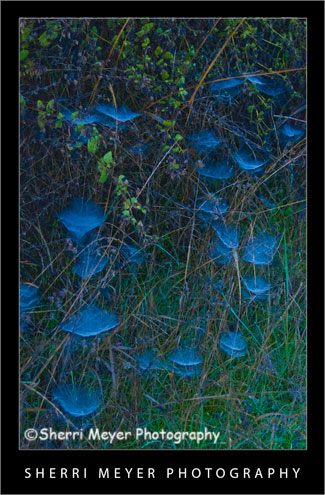
Ethereal-Webs-2Backlit spider webs covered with dew, Auburn, California.

One fall morning while on a hike, I found these webs all lit up beautifully with backlighting and covered with dew.

Why this photo makes me say WOW!

  1. Backlighting – Backlighting is one of my favorite types of lighting. I think it worked really well here.
  2. Colors – I really love green & blue together. I think the two colors compliment each other well. Our house is even decorated with green & blue.
  3. Uniqueness – It’s not every day you get to witness dewey, backlit spider webs. If it hadn’t been for the fact that I was trying out my brand new first DSLR (a Nikon D70) and looking for things to photograph, I could have missed this opportunity. The others I was hiking with didn’t even notice them!

I hope you keep your eyes wide-open next time you are out and about with your camera. You just never know what you might stumble upon!

Thank you for visiting. If you would like to leave a comment, simply click on the “comments” link (add your message in the box) at the bottom of this post.

You can also sign up for a “free” subscription to this Blog. Just look in the upper right hand side of the Blog under “Subscribe to Sherri’s Blog.” Then, either click on the orange button, or enter your email address and click on “subscribe.”

Visit our Stock Photo Website for links to photo galleries.

Monday’s Makeover: My Neighborhood

by Sherri on July 13, 2009

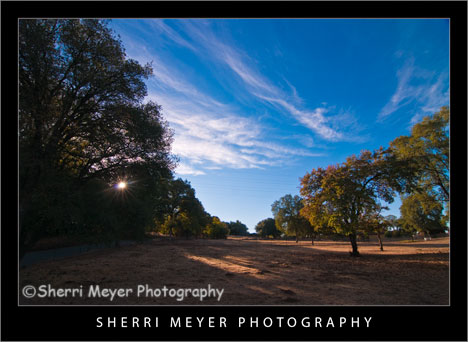
Rural-Auburn-CA

Photo #1 - My neighborhood, rural Auburn, California.

While looking through my images this morning for an image to makeover, I came across this one. This is very much the way the lighting would look at this location if we were walking right now.

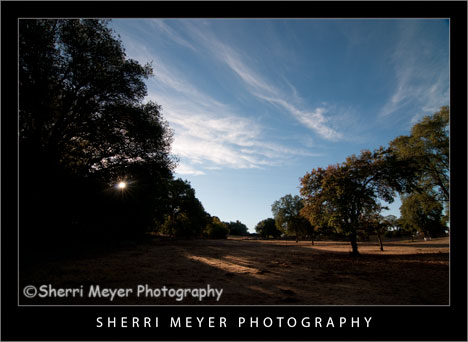
Rural-Auburn-CA-2

Photo #2 - This is the way the photo looked straight out of the camera.

Can you guess what I did to photo #2 below to get the results you see in the top photo? Bring on the guesses. I’d love to hear from you. While it’s pretty tough to guess exactly what all was done, some of you come pretty darn close. I will reveal the answers later in the week. Thank you in advance for your participation!

Thank you for visiting. If you would like to leave a comment, simply click on the “comments” link (add your message in the box) at the bottom of this post.

You can also sign up for a “free” subscription to this Blog. Just look in the upper right hand side of the Blog under “Subscribe to Sherri’s Blog.” Then, either click on the orange button, or enter your email address and click on “subscribe.”

Visit our Stock Photo Website for links to photo galleries.

Monday’s Makeover Update:

Well, I didn’t get a whole lot of responses, but thanks to Matt and Hali for your participation! Here is what I did in Lightroom to improve my original photo:

  1. Made a virtual copy.
  2. Set white balance to daylight.
  3. Set recovery to 10.
  4. Set fill light to 25.
  5. Set blacks to 0.
  6. Set clarity to 50.
  7. Set vibrance to 80.

NOTE: Unfortunately, I don’t have time to post a Monday Makeover this week. I have taken on a few new projects that are eating up my blogging time.

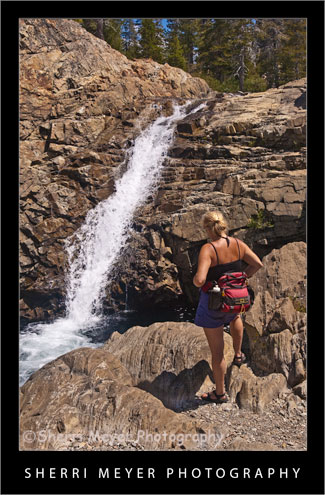
hiker-canyon-creek

Photo # 1 - Hiker viewing one of several waterfalls on Canyon Creek, near Lake Faucherie, Tahoe National Forest, California.

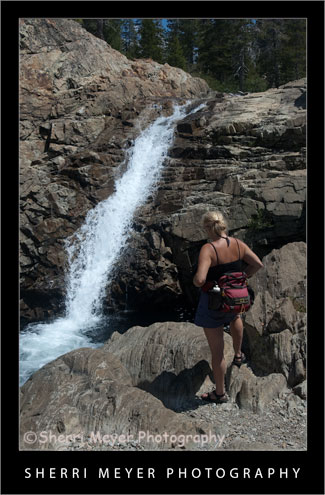
Can you guess what I did to photo #2 (below) in Lightroom to achieve the results you see in #1? This week I’m doing something a little different with my Monday Makeover. Instead of telling you what I did, I am curious to see if you can guess what I did. I will let the cat out of the bag, after I get a few responses.

hiker-canyon-creek2

Photo #2 - This is what the photo looked like straight out of the camera.

Thank you for visiting. If you would like to leave a comment, simply click on the “comments” link (add your message in the box) at the bottom of this post.

You can also sign up for a “free” subscription to this Blog. Just look in the upper right hand side of the Blog under “Subscribe to Sherri’s Blog.” Then, either click on the orange button, or enter your email address and click on “subscribe.”

Visit our Stock Photo Website for links to photo galleries.

Photo Update – the cat is out of the bag! (July 10th)

Thanks to all of you that gave your best shot at guessing what I did during this photo makeover. I won’t make you wait a minute longer. I am now letting the cat out of the bag. Here is what I did to the original photo in Lightroom 2.

  1. Set White Balance to daylight.
  2. Set the Fill Light to +40.
  3. Set the Clarity to +100.
  4. Set the Vibrance to +70.

That’s it folks. Thanks again for your participation and for your patience!