d300-double-exposure

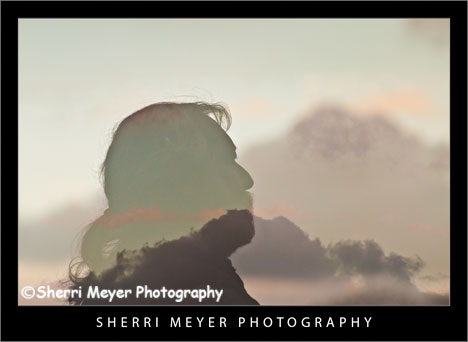
Photo #1 - Double exposure of a man in silhouette and a cloudy sky at sunset.

After writing my post “D300 Double Exposure” a couple of weeks ago, I’ve had several D300 owners contact me wanting to know how to make them. I decided since there was so much interest in this subject, I should write an article on “How to make multiple exposures with a Nikon D300.”

Making multiple exposures with the Nikon D300 is really quite simple. But, if you are like me, it’s a lot easier to be shown or guided by someone, than it is reading the camera manual.

Choosing a subject

First, choose a subject you want to practice on. Don’t be too particular about the subject at first. Just practice and have fun. You will learn what works and what doesn’t. Also, there really isn’t really a right or wrong way to do it. If it pleases you in the end, that’s all that really matters.
d300-double-exposure3

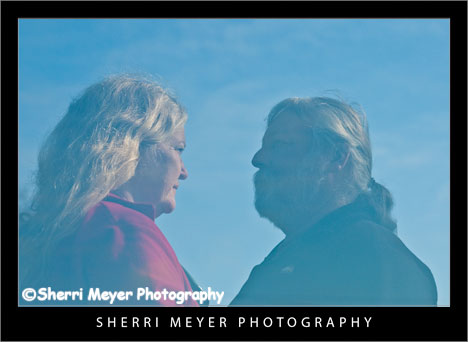
Photo #2 - Double exposure of a couple.

I have found that people make great subjects for multiple exposures. There are a lot of different ways you can shoot multiple exposures of people.
d300-double-exposure4

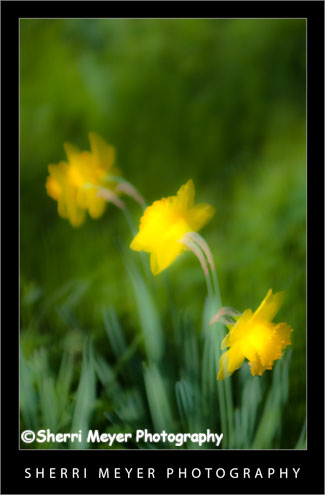
Photo #3 - Double exposure of a Daffodil Plant. In the 1st photo, I focused on the first flower. Then, the wind came up and I took the 2nd photo.

Flowers also work really well and have unlimited possibilities. You are really only limited by your imagination.
d300-multiple-exposure

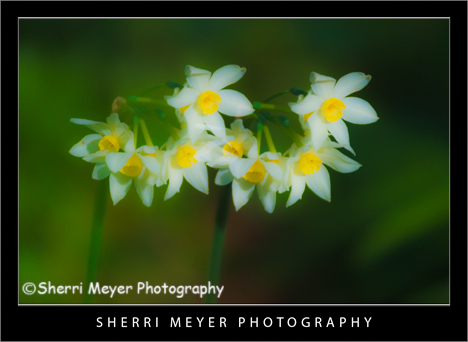
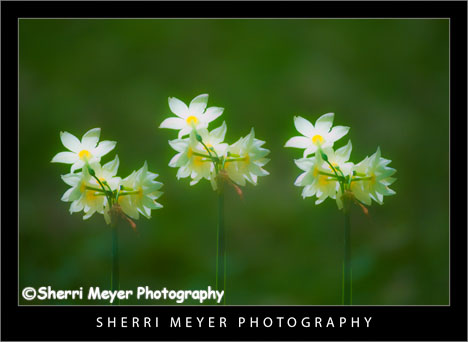
Photo #4 - Triple exposure of a Narcissus Plant.

Setting your Nikon D300 for multiple exposures

  • On the back of your camera, press the menu button at the upper left.
  • Select the shooting menu. Press right arrow on the multi selector button, to access the shooting menu.
  • Press the down arrow, until multiple exposure is highlighted.
  • Press right arrow and highlight number of shots. I recommend starting with 2 (the default), which gives you a double exposure.
  • Press the right arrow again and the number of shots will be highlighted. To change the number of shots, press the up or down button until the number you want is selected. Then, press the OK button.
  • Highlight auto gain and press the right arrow. Highlight either ON or OFF and press OK. Normally, you will want to leave the auto gain set to ON. This will automatically adjust the gain for multiple exposures. However, if your subject has a dark background, or you want to adjust the exposure manually, then set the auto gain to OFF.
  • Highlight done and press OK.

You are now ready to take your first shot. After taking your first shot, look in the monitor to see what you got. Then, frame and take your next shot. Note: After the first exposure is taken, if no operations are performed for 30 seconds, the camera will end the multiple exposure mode.

Now, when you want to take another photo with the same amount of exposures, all you have to do is to return to the shooting menu, press the right arrow 2 times and your ready to take another multiple exposure.

Other Tips

Keep in mind that simple backgrounds work best. Also, the use of a tripod would make creating multiple exposures easier in some cases. However, I did not use one for any of these photos.

How you can participate

There are so many different ways to create a multiple exposure. Do you have any ideas you would like to share with the readers of this Photo Blog? Awesome! Feel free to add them in the comments section below.

Thank you for visiting. If you would like to leave a comment, simply click on the “comments” link (add your message in the box) at the bottom of this post.

You can also sign up for a “free” subscription to this Blog. Just look in the upper right hand side of the Blog under “Subscribe to Sherri’s Blog.” Then, either click on the orange button, or enter your email address and click on “subscribe.”

Visit our Stock Photo Website for links to photo galleries.
Spring Has Sprung!

by Sherri on March 29, 2009

narcissus31
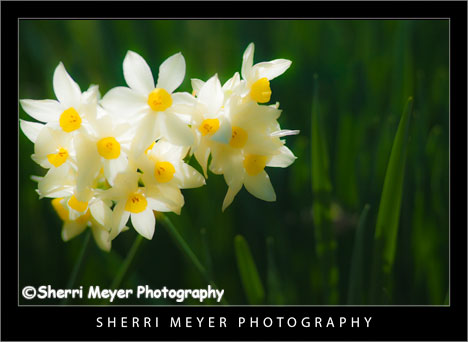
Narcissus blooming in my yard, Auburn, California.

This photo of the Narcissus Plant was taken on the same day this Narcissus photo in my previous post was taken.

How I got the shot

These Narcissus were shot on a Nikon D300, with an 80-200 zoom lens attached. I choose 3:30 in the afternoon to photograph them, so I could take advantage of my favorite type of lighting, backlighting. The shutter speed, aperture and ISO used were: 1/2000 sec., f 4.0 and ISO 200.

For post-processing in Lightroom 2.1, I set the Clarity to -100 to give it a soft look and pushed the Vibrance to +100 to add punch to the color.

Coming Next – “How to make multiple exposures with a Nikon D300.”

Thank you for visiting. If you would like to leave a comment, simply click on the “comments” link (add your message in the box) at the bottom of this post.

You can also sign up for a “free” subscription to this Blog. Just look in the upper right hand side of the Blog under “Subscribe to Sherri’s Blog.” Then, either click on the orange button, or enter your email address and click on “subscribe.”

Visit our Stock Photo Website for links to photo galleries.
Mystery Rider

by Sherri on March 23, 2009

horseback8
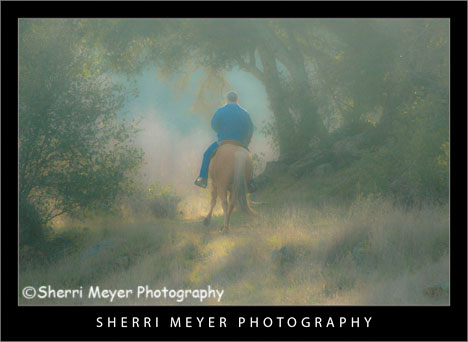
Man riding his Palomino, Cronan Ranch, Pilot Hill, California.

Yes, I am definitely “hooked on horses” lately! I couldn’t resist capturing this guy riding his horse through this little opening in the oaks. It already had a mysterious look to the scene. So, I decided to add to that look, by doing a little experimenting in Adobe Lightroom 2.1.

To get this look, I used the “Direct Positive” preset, which gave it the color tone. Then, I set the “Clarity” to -100 in the Develop Module. That gave it the dreamy, mysterious look.

Thank you for visiting. If you would like to leave a comment, simply click on the “comments” link (add your message in the box) at the bottom of this post.

You can also sign up for a “free” subscription to this Blog. Just look in the upper right hand side of the Blog under “Subscribe to Sherri’s Blog.” Then, either click on the orange button, or enter your email address and click on “subscribe.”

Visit our Stock Photo Website for links to photo galleries.
Long Valley Trail

by Sherri on March 19, 2009

horseback7
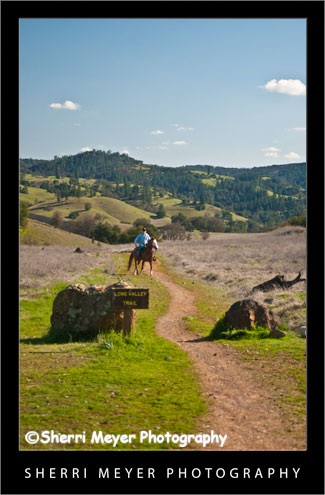
Man horseback riding on the Long Valley Trail, Cronan Ranch Regional Trails Park, Pilot Hill, California.

Horseback riding doesn’t get any better than this. These two were out for a Sunday ride, on one of several Cronan Ranch Trails, the Long Valley Trail. The trails here offer spectacular views, access to the American River, wide-open spaces and a whole lot more.

For more information on the Cronan Ranch, click on the El Dorado County category on the sidebar of this blog.

Thank you for visiting. If you would like to leave a comment, simply click on the “comments” link (add your message in the box) at the bottom of this post.

You can also sign up for a “free” subscription to this Blog. Just look in the upper right hand side of the Blog under “Subscribe to Sherri’s Blog.” Then, either click on the orange button, or enter your email address and click on “subscribe.”

Visit our Stock Photo Website for links to photo galleries.
Horseback Riding at the Cronan Ranch

by Sherri on March 17, 2009

horseback6

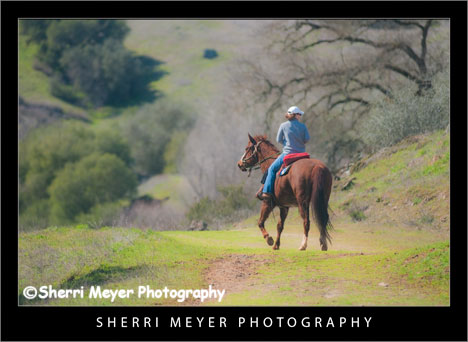
Woman riding her horse at the Cronan Ranch Regional Trails Park, Pilot Hill, California.

If you are looking for a great place to trailer your horse in the Sierra Foothills, be sure to check out the Cronan Ranch. It offers 12-miles of multi use trails, plenty of parking and it’s FREE! You can also ride your horse right down to the South Fork of the American River and have a picnic. I sure wish I had a place like this to ride, when I had my horse!

The Cronan Ranch Regional Trails Park is located on the corner of Hwy 49 and Pedro Hill Rd. in Pilot Hill. You can download a copy of the Cronan Ranch Trails Park Guide here.

Thank you for visiting. If you would like to leave a comment, simply click on the “comments” link (add your message in the box) at the bottom of this post.

You can also sign up for a “free” subscription to this Blog. Just look in the upper right hand side of the Blog under “Subscribe to Sherri’s Blog.” Then, either click on the orange button, or enter your email address and click on “subscribe.”

Visit our Stock Photo Website for links to photo galleries.
Cronan Ranch Regional Trails Park

by Sherri on March 14, 2009

cr-cabin6

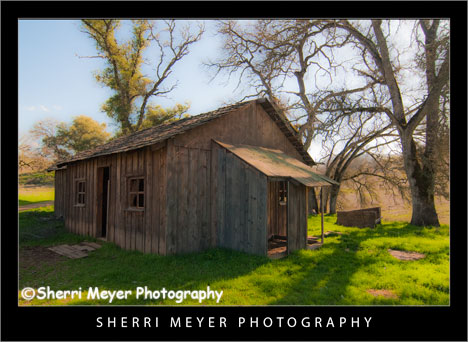
Movie set for Michael Landon Jr.'s film "Love Comes Softly," Cronan Ranch Regional Trails Park, Pilot Hill, California.

We returned to the Cronan Ranch for another photo shoot and hike a few days ago. This time around, the grass was green and it was even more beautiful than it was during our first visit to the park on New Year’s Day.

We plan to return again soon to capture more rafting, kayaking and canoeing photos, as well as wildflowers. We hear the wildflowers put on a pretty good show there. It should get good in another couple of weeks or so.

To see more photos of the Cronan Ranch Regional Trails Park, please refer to my El Dorado County category on the sidebar of this Photo Blog.

Thank you for visiting. If you would like to leave a comment, simply click on the “comments” link (add your message in the box) at the bottom of this post.

You can also sign up for a “free” subscription to this Blog. Just look in the upper right hand side of the Blog under “Subscribe to Sherri’s Blog.” Then, either click on the orange button, or enter your email address and click on “subscribe.”

Visit our Stock Photo Website for links to photo galleries.
rafting
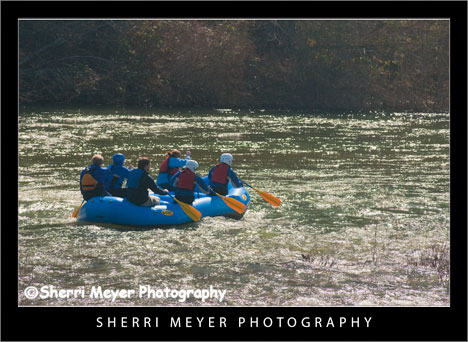
Early season rafters, paddling a smooth section of the South Fork of the American River, near Coloma, California.

This photo was taken during my photo shoot this past Sunday, at the Cronan Ranch Regional Trails Park.

One of the great things about living in Auburn is it’s location. We are located in the heart of the California Gold Country and in the midst of one of the best recreational playgrounds in the country. Within minutes, we can be hiking, skiing, mountain biking, whitewater rafting, kayaking, canoeing, trail running, gold panning, fishing to name just a few. [click to continue…]

D300 Double Exposure

by Sherri on March 4, 2009

narcissus
Nikon D300 double exposure of a Narcissus plant in my yard.

I’ve been trying a lot of new things with my Nikon D300 lately. The most recent thing I tried was a multiple exposure.

The first sign of spring here in the Sierra Foothill’s is usually the abundance of Narcissus “springing” up everywhere. I decided they would be a good subject to use for my multiple exposures.

I can remember making them many years ago with my Canon A-1. With the older cameras, you had to do a lot of math to create them. Making them with the D300 was a “piece of cake!” All I had to do was decide how many exposures I wanted to make on a single frame and it did the rest.

Enjoy!

Thank you for visiting. If you would like to leave a comment, simply click on the “comments” link (add your message in the box) at the bottom of this post.

You can also sign up for a “free” subscription to this Blog. Just look in the upper right hand side of the Blog under “Subscribe to Sherri’s Blog.” Then, either click on the orange button, or enter your email address and click on “subscribe.”

Visit our Stock Photo Website for links to photo galleries.